


Use AI at work by giving it one bounded task, the facts it may use and a way to check the answer. The worked example below turns a task list into a plan that fits the available time without inventing a missing input.
This workflow is for a work task you already have. If you need a learning sequence first, use the beginner AI path and return here with one task to try.
Try a plan you can check yourself
Use this fictional task list rather than uploading workplace data:
I have 120 minutes available this afternoon.
Finish the project brief: 45 minutes, due today.
Draft an internal update: 30 minutes, due tomorrow.
Prepare a presentation deck: 60 minutes, waiting for figures from Jo.
The figures have not arrived. No other deadlines are known.
The estimates are supplied inputs for this exercise, not measurements of how fast a person or AI can work. Ask:
Plan this afternoon using only the supplied task list.
Do not exceed 120 minutes. Keep blocked work out of the scheduled list.
Show planned tasks, total minutes, unused time and questions.
Do not invent a date for the missing figures or shorten task estimates.
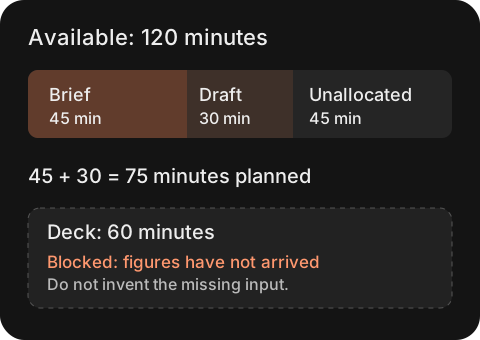
One valid reference plan is the brief followed by the internal update: 45 + 30 = 75 minutes, leaving 45 unallocated. The deck stays blocked. This is an answer derived from the fixture, not a recorded response from a particular AI product.
Check a draft in this order:
- Did it prioritize the brief due today?
- Does its arithmetic match the supplied estimates?
- Did it leave the deck blocked instead of assuming Jo would deliver?
- Did it leave unused time visible rather than fill the calendar with invented work?
If it schedules all three tasks, point to the two specific errors: the total would be 135 minutes, and the deck lacks an input. Ask for a correction, then recheck the full plan.
Choose a task you can check
Use material you own and can inspect. Turning meeting notes into decisions, sorting a rough task list or drafting a first reply from approved facts are good starting points. A task is ready to try when a mistake is cheap to correct and the result stays private until review.
Leave out work that needs a professional judgment, an external commitment or an irreversible action. If the task is high stakes, shrink it until the output is a draft or a checklist rather than a decision.
Give the AI the information it needs
Write four parts before you open a chat:
- The job: what you want done.
- The source: notes, facts or examples it may use.
- The boundary: what it must not assume or do.
- The format: what the finished draft should look like.
For example, ask for a weekly plan from your own task list and calendar limits. Request a short table with priorities, blocked work and questions. Tell the model not to invent deadlines or extra working hours.
Review the first result against the source
Check names, dates, numbers, commitments and missing information before you improve the writing. If a fact is not in the source, remove it or mark it as an open question. Then check whether the format helps the next person act.
Keep a note of the first failure you find. It may show that the source was incomplete, the instruction was vague or the task was too broad. Change one of those things and run the same task again.
Build a habit you can repeat
Repeat the process with five ordinary tasks. Save the instruction only after you can predict the common error and catch it quickly. A useful practice loop is: choose, brief, draft, review and revise.
When one task keeps working, move to a full process such as the meeting summary workflow or the weekly priority planning workflow. Save the input and corrected result together so the next attempt has a reference.
Keep a task brief you can reuse
Task and reader:
Source material I am allowed to use:
Required result and format:
Facts that must stay unknown:
Actions the assistant must not take:
Person who checks the result:
Evidence needed before sharing:
Fill this in before opening the Prompt Builder. If you cannot name the source or the reviewer, keep the exercise fictional until you can.
Questions about workplace use
Can I paste a real customer message?
Follow your organization’s rules and the approved service’s data controls. For practice, replace personal details and confidential facts with fictional ones. Removing a name alone may not remove identifying information.
Should I use all the time left in the example?
Only if you have another real task that can start. Leaving 45 minutes unallocated is more honest than inventing work or assuming that blocked inputs will arrive.
What if the second draft is also wrong?
Return to the source and do the task manually if needed. Save the failure to improve the task brief; repeated fluent answers are not evidence of correctness.