


Choose generative AI tools by the output you need: ChatGPT or Claude for a draft, Firefly for an image concept, or Runway for a generated video. If you already have a recording, an editor such as Descript may solve the job without generating new footage.
Named tools and the jobs to try first
The product capabilities below come from official documentation checked on September 21, 2026. Task choices and acceptance checks are editorial recommendations. We have not run a cross-product benchmark, and the order is not a ranking.
| Product | Documented capability | A useful first task | What to check |
|---|---|---|---|
| ChatGPT | Drafting, document analysis and image generation, with features depending on settings and access | Turn an event brief into page copy, then develop a separate image concept | Verify dates and claims against the brief; do not assume every feature is available on your plan. |
| Claude | Drafting and working with supplied information | Turn the same event brief into an outline or revised copy | Compare omissions and editing effort, not the confidence of the prose. |
| Adobe Firefly | Text-to-image generation | Create a wide hero image with a defined copy area | Check the crop and unwanted details in the actual export. |
| Runway | Video generation and editing | Explore a simple motion idea or a change to a shot | Check continuity across the whole clip, not only its opening frame. |
| Descript | Edit recorded audio and video through a transcript; includes AI audio tools | Cut a supplied workshop recording into a shorter explanation | Listen to the cut: text edits can remove context or make transitions awkward. |
ChatGPT and Claude overlap on writing tasks. Use the same source and required format to decide which works better for you; this guide does not establish a universal writing winner. Runway and Descript address different starting points in this comparison: creating a new shot versus editing recorded material. Some products span both jobs, so test the specific feature you intend to use.
For precision layout and image-editing choices, see AI tools for designers.
Compare tool categories by the job
| Tool category | Useful job | Input you need | Output to inspect | A limit to plan for |
|---|---|---|---|---|
| Text generation | Turn approved notes into an outline or first draft | A source packet and writing constraints | Claims, omissions, tone and formatting | Fluent text can add details absent from the source |
| Image generation | Explore a visual concept for a defined placement | A visual brief, permitted references and exclusions | Composition, required objects, readable space and unwanted details | A good-looking image can still fail product, brand or rights checks |
| Video generation | Test a short motion idea before production | A shot card, duration, subject and movement boundary | First frame, motion, continuity and export suitability | Short clips do not replace a full production plan or approvals |
| Audio generation | Make a scratch narration or sound direction | A script, voice requirements and permitted material | Pronunciation, pacing, disclosure and usage permission | Voice and music use need rights and consent review |
The category helps narrow the shortlist. The next check is whether a particular product can return the format you need from the material you actually have.
Run one complete tool-choice example
Use this fictional studio brief as a test packet. The example output is an editorial answer key, not a captured product result.
BUSINESS: Northline Studio.
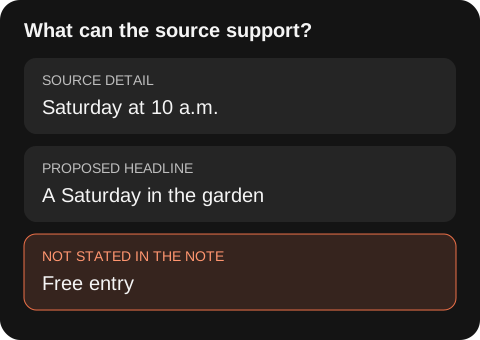
OFFER: Beginner strength classes on Tuesday and Thursday at 6 p.m.
ACTION: Visitors can request a trial through the existing booking form.
NOT SUPPLIED: Price, capacity, equipment list or guaranteed outcomes.
NEEDED NOW: A headline, two sentences of page copy and button text.
OPTIONAL LATER: A decorative hero image. No video is required.
Paste the packet into ChatGPT or Claude with this prompt:
Write one headline, two sentences and a booking-button label from this brief.
Use only the supplied offer facts. Do not describe the trial as free.
List missing information separately, not inside the customer-facing copy.
An acceptable result is:
Beginner strength classes at Northline Studio

Join a beginner strength class on Tuesday or Thursday at 6 p.m.
Use the booking form to request a trial.

Button: Request a trial
Suppose a candidate says, “Book your free small-group session and see results in two weeks.” Reject those additions: the packet supplies no price, capacity or promised outcome. A useful follow-up is, “Remove free, small-group and the two-week result. Keep the class days, time and trial request.” Check the revision against the packet rather than just asking whether it sounds better.
You now have the required copy. There is no reason to subscribe to an image or video tool to finish this text task.
If the page later needs a decorative hero, test Firefly or ChatGPT Images separately with: “Wide illustration of a kettlebell on the right against a dark background; empty left half for separate text; no logos or lettering.” Treat it as an illustration, not evidence of the studio’s facilities. Assemble the image and real text in your page editor.
If movement later becomes part of the brief, test a simple shot in Runway and inspect it frame by frame for changes in object shape. If the studio supplies a real recorded introduction instead, try Descript for the editing job. Choose the new tool only when the required output changes.
When each category is a fit
Choose text generation when the work starts with words or structured source material and you can check every factual claim. Choose image generation when the next decision is visual and the brief contains a placement, subject and exclusions. Choose video generation when movement is the question and a short test can settle it. Choose audio generation when a script and use permissions are already clear.
Do not choose a generative tool when the job needs an authoritative current answer but you do not have a retrieval and source-check process, when you cannot safely provide the input, or when there is no reviewer who can decide whether the output is acceptable.
A practical scorecard
Score a short trial with the same criteria for every product you test. A product that has more features is not automatically the better fit.
| Check | Question | Pass signal |
|---|---|---|
| Input fit | Can it accept the approved material without changing the task? | You can provide a small permitted test packet |
| Output fit | Does it return a format your team can edit or hand off? | The draft, image or clip works in its intended placement |
| Evidence | Can a reviewer trace important claims and decisions? | The source, prompt and output stay together |
| Control | Can you state the constraints that matter? | The result follows required format, placement or exclusions |
| Failure handling | Can you spot and correct a bad result? | A reviewer can name the failed check and next action |
Keep a one-page trial record: task, permitted input, prompt, output, failed checks, correction and decision. This is more useful than a generic list of “best AI tools.”
Decide whether to keep, change or stop a trial
Use the same packet and one correction attempt for each candidate. This is a suggested testing budget, not a product limit. Keep the first outputs so you can compare how much repair each needed.
| Trial outcome | Decision |
|---|---|
| Required facts and format are correct after a small edit | Keep this candidate for the task. |
| Both assistants miss the same ambiguous instruction | Clarify the brief before switching products. |
| The output is good but cannot be handed off in the needed format | Try an editor or a product with the required export. |
| The tool keeps inventing offer facts after correction | Stop using that output and compare another candidate against the same packet. |
| You cannot supply the input under your organization’s policy | Stop the trial with that data; use a fictional packet or an approved environment. |
Before buying, check the specific plan for input size, generation allowance, export format, watermark rules and team access. Include correction attempts in your cost estimate. A useful comparison is total trial spend divided by accepted deliverables; a low cost per generation can still produce an expensive finished asset. Keep editing time as a separate measurement unless you have a stated hourly rate.
Common selection mistakes and fixes
Test the real job instead of relying on a product demo. Use a small approved task with your own required format and acceptance criteria.
When wording sounds certain, check whether the source supports it. Ask the tool to list missing facts separately and compare the draft with the original material.
Replace “make it premium” with a placement and composition. A dark background, an object on the right and a clear text area give you something you can inspect.
Use fictional or approved inputs for the trial. Check the product terms and internal policy before uploading confidential material or publishing generated assets.
Frequently asked questions
Which generative AI tool is best for every task?
None. Pick the category that fits the input, output and review method for one defined job, then test the product options that meet those requirements.
Should I use one tool for text, images and video?
You can, if it completes each job and the team can review the outputs. Do not assume that a tool’s support for several media types gives equal control or quality in each one.
How long should a tool trial take?
Keep the first trial small enough to review in one sitting: one source packet, one output and one correction pass. Expand only after the process is repeatable.
Put the chosen tool into a workflow
Once a candidate passes the scorecard, connect it to a repeatable task. Use the AI blog outline workflow for source-bound drafting, the AI video script workflow for a shot plan, or the AI image guide for a visual brief and comparison.