


To use generative AI, give it a task and the source material it may use, then check which parts of the result that source supports. The three exercises below use the same note to extract details, draft a reminder and suggest a headline. Generative AI creates content using patterns learned during training and the context supplied in a request; a fluent draft can still add unsupported facts.
Try one source in three tasks
Use this fictional announcement as the complete source:
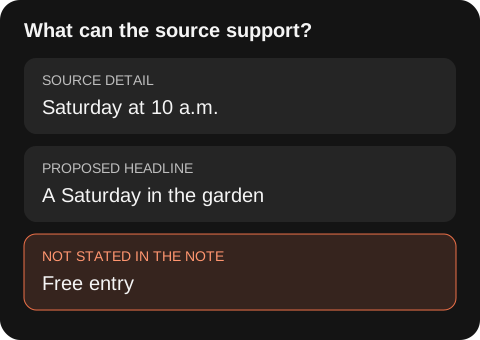
The community garden opens Saturday at 10 a.m. Bring gloves. Registration is required; the note does not include a registration link.
The examples below are written teaching examples, not recorded AI responses. They show how the same source changes the review you need to perform.
| Request | Example answer | What to check |
|---|---|---|
| Extract the time and preparation | Saturday, 10 a.m.; bring gloves | Both details appear in the source |
| Draft a reminder using only the note | “The community garden opens Saturday at 10 a.m. Bring gloves and register before attending. Registration link: not provided.” | The wording changes, but the event details remain supported |
| Suggest a headline | “A Saturday in the garden” | This is a proposed title, not a fact from the note |
A draft that adds “free entry and tools provided” has introduced two unsupported claims. The source neither confirms nor denies them. Delete those claims or ask the organizer before using them.
What a generative model produces
A text model predicts a continuation based on its training and current context. The result may summarize your input, imitate a format, combine ideas or draft something new. Strong prose does not prove that the names, dates or reasoning are correct.
Models also differ by product, version, enabled tools and context limits. Learn a task method that survives those changes: provide the relevant source, state the boundaries, request a checkable format and review the output.
Four useful task shapes
Transformation changes format without adding claims, such as turning notes into a table. Extraction pulls named fields from supplied material. Drafting creates a new version under stated constraints. Exploration generates options or questions that a person will judge.
These shapes carry different risks. Extraction can omit a field; drafting can add an unsupported claim; exploration can make a weak option sound settled. Name the task shape before choosing the review.
Practice with a closed source
Take a page of your own notes. Ask the model to return decisions, action items and unanswered questions, using only that text. Require a direct quote or line reference for every decision. Then compare each item with the source.
Record false additions and missed details. Revise the instruction once, run it again and compare. This turns prompting into an observable exercise rather than a hunt for a magic sentence.
Add external knowledge carefully
Open-ended questions invite the model to rely on learned patterns that may be stale or wrong. If current facts matter, use a tool that can retrieve sources, open the cited pages and confirm that they support the claim. A link alone is not evidence; the source must say what the draft says it says.
For research, separate observed facts from inference. The market research workflow keeps citations, hypotheses and open questions in different parts of the brief.
Protect private and consequential inputs
Before pasting information into any service, check the product’s data controls and your organization’s policy. Remove personal or confidential details unless the approved setup requires them. For legal, medical, financial, employment or safety decisions, use qualified review and a purpose-built process.
NIST’s generative AI profile is a companion to its voluntary AI Risk Management Framework, which covers the design, development, use and evaluation of AI systems. For this exercise, keep a record of unsupported additions and the instruction you changed.
Check claims before using a draft
Copy this worksheet and fill one row for each factual statement. Keep proposed wording in a separate section so you do not accidentally treat a creative choice as evidence.
Statement in the draft:
Exact supporting words in the source:
Classification: supported / contradicted / not stated
Action: retain / correct / remove / ask the owner
Question still to resolve:
For “free entry,” the supporting words field is empty, the classification is “not stated,” and the next action is to remove the claim or ask the organizer. “Not stated” does not mean “false.” It means this source cannot settle the question.
Choose what to practice after these exercises
Choose a practice area from the errors you found in the garden tasks. Use the table to decide what evidence you will keep from your next attempt.
| Topic | Practice you should be able to inspect |
|---|---|
| How generated content differs from evidence | Label supported details and invented additions in one draft |
| Writing instructions | Change the audience or output format while preserving the source facts |
| Evaluating an answer | Compare an answer with an explicit reference or checklist |
| Working with missing information | Keep an absent date or source link unresolved |
| Using outside sources | Open a citation and check the specific claim it is attached to |
| Handling work data | Identify which information you are permitted to share before entering it |
The table is a practice checklist. For a structured lesson sequence, see the existing Generative AI course; this guide supplies the three source exercises and review worksheet.
Questions about learning generative AI
Is extracting a date the same as creating a new idea?
They require different checks. The extracted date must match the source. A proposed headline can be new, but it should not smuggle in a claim such as free entry.
Does a source link make an answer reliable?
Open it and find the supporting passage. A working link can still point to a page that says nothing about the claim.
Can I complete the exercise without an AI account?
Yes. Classify the sample statements using the note, then write your own reminder. An AI tool adds a draft to review; the reference checks remain the same.
A sensible next step
Learn the prompt structure, then complete one workflow using material you already know. Move to automation only after the manual process works and its exceptions are visible.